Getting Started
📰 How To Copy A Strategy
Your step-by-step resource for using UniFAI. Learn how to copy expert moves, and leverage AI agents to simplify your DeFi journey, whether you’re a beginner, trader, or pro.
Follow these steps to copy and run someone else’s strategy on UniFAI.
- Accessing Strategy Agent
Go to https://chat.unifai.network/ and click on Strategies from the navigation menu.
- Login
Click Sign in at the top right corner and connect your Telegram account. You must be signed in to copy and run strategies.
- Finding Strategies To Copy
On the Strategies page, click Explore strategies. You will see a list of available strategies created by other users. Browse through the strategies and click on any one to view its details.

- Executing Your Copied Strategy
Choose a wallet. If you already have one, select it. If not, click Create Wallet and set up a Solana or EVM wallet.
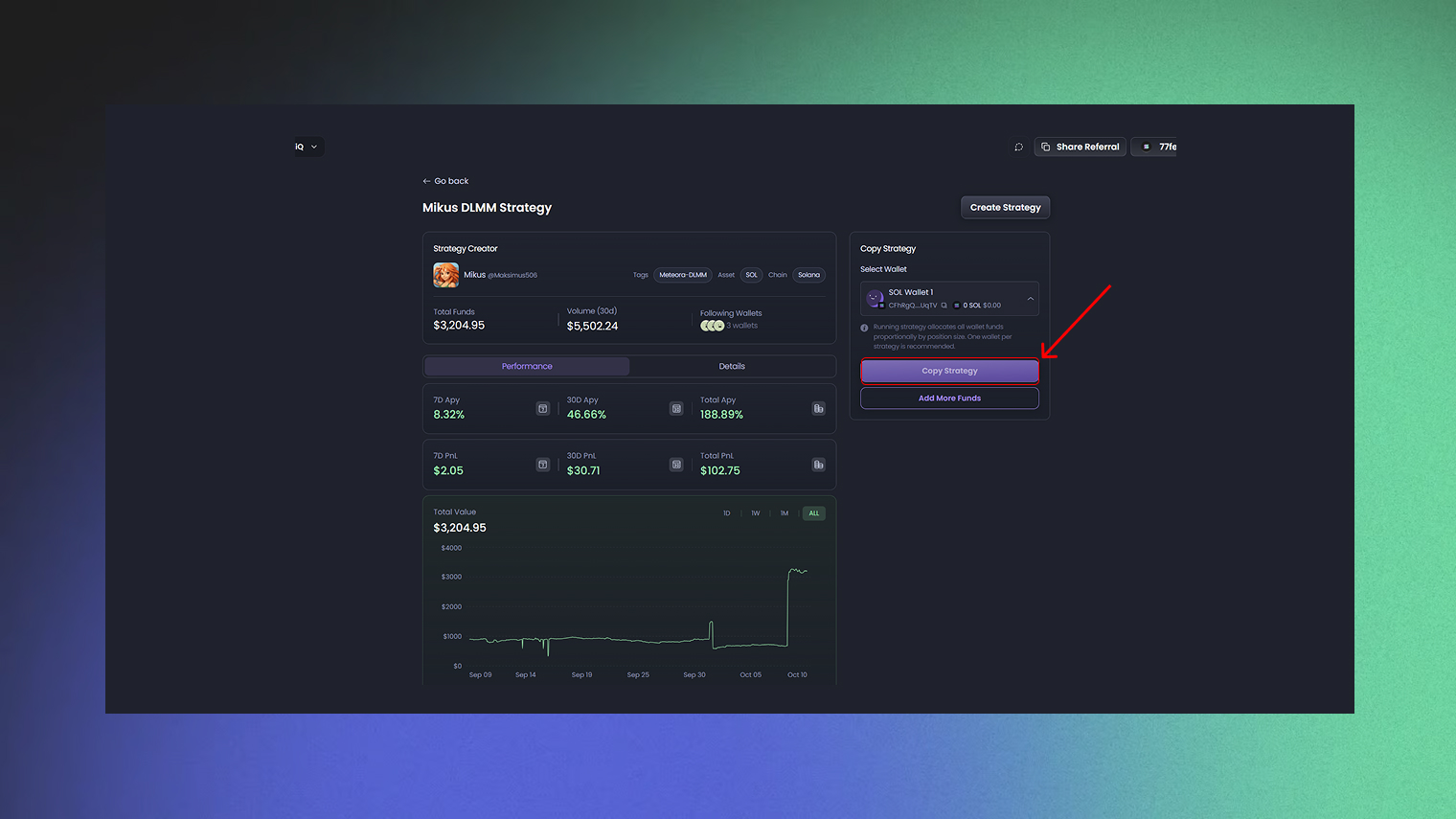
Start the strategy. The agent will now execute automatically based on its trigger.
Info
Deposit at least 0.05 SOL into your wallet if you are running a strategy on Solana. Always double-check the wallet address and network before transferring funds.
Monitor your strategy. You’ll receive execution reports on Telegram, and you can check your assets and positions on the Wallet page. You can also pause, stop, or close positions manually if needed.